

Bitrate in video streaming
For video content, a higher bitrate is synonymous with improved image quality, thanks to the greater volume of data transmitted per time unit. This not only affects the video file’s size for local viewing but also determines the requisite network bandwidth for users to enjoy a seamless streaming experience. The following table illustrates approximate video bitrates for various common resolutions: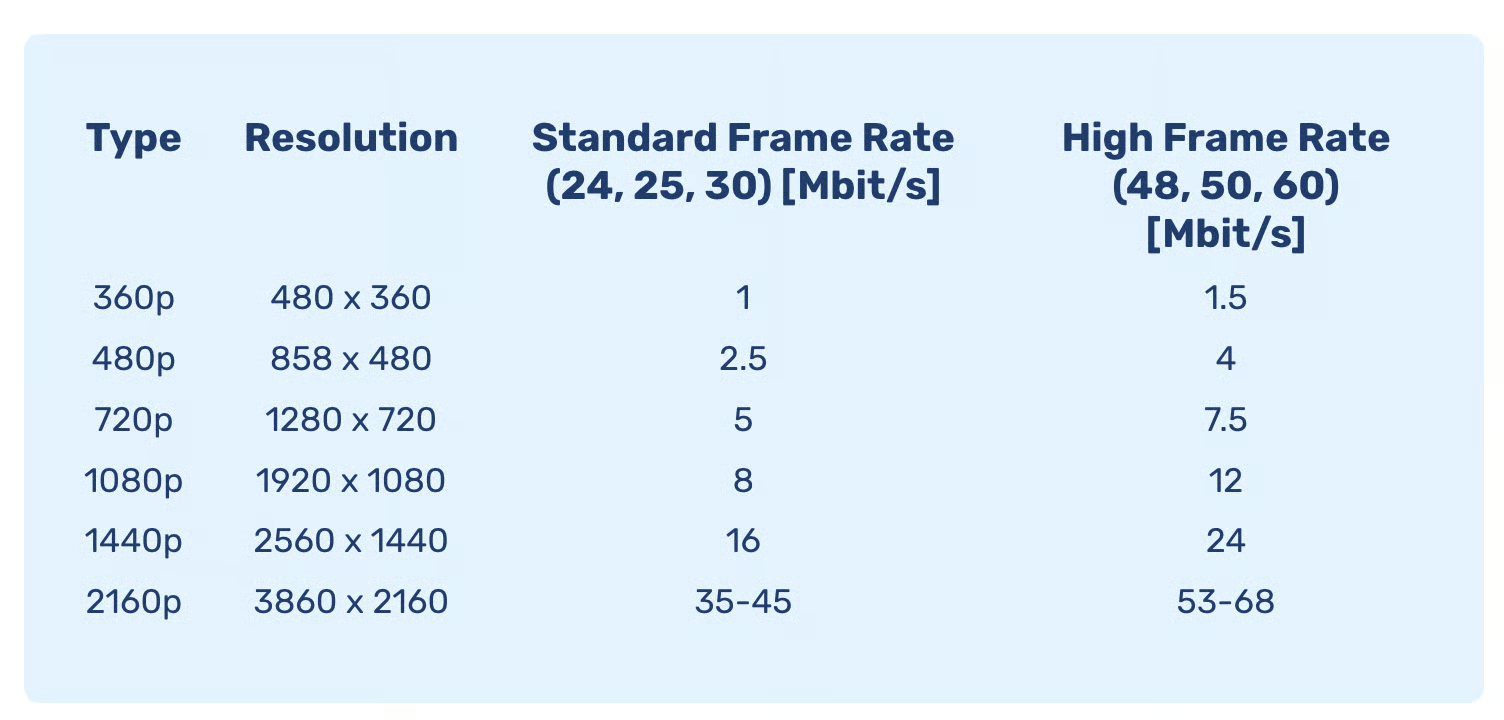
Encoding
Encoding transforms digital video into a specific format by identifying patterns within the video. It replaces repetitive elements with references, thereby reducing file size or the required bitrate. While lossless compression allows for a perfect reconstruction of the original video, lossy compression eliminates deemed unnecessary information, which cannot be recovered later. Lossy compression is generally preferred for encoding video to store as much visual data as possible into fewer bits. The efficacy of encoding depends on the algorithm’s settings, its computational complexity, and the available hardware and software support.Resolution
Resolution specifies the pixel count constituting a single video frame. Typically, higher resolutions mean a sharper image and enhanced video quality, improving the viewing experience on larger displays. Resolution is denoted by the formula Width x Height, indicating the total number of pixels. For instance, a resolution of 480 x 360 equates to 172,800 pixels. In broadcasting and video players, resolutions are often represented only by their height (e.g., 480, 720, 1080).Framerate
Framerate, or frames per second (fps), dictates the frequency at which video frames are displayed, creating the illusion of motion. While 24 fps is standard for most video formats, content with rapid movements might benefit from higher framerates, ranging from 30 to 60 fps.Adaptive bitrate streaming
Adaptive bitrate streaming optimizes video resolution and framerate based on the viewer’s network bandwidth. This technology allows users with high bandwidth to enjoy high-quality streams, whereas those with limited bandwidth can reduce the resolution and framerate to suit their constraints. Adaptive bitrate streaming enhances the user experience by minimizing buffering and ensuring smooth playback under varying network conditionHow the player selects a quality
Adaptive bitrate streaming is enabled automatically in the BMDRM player. There is nothing to opt in to: the player picks a rendition from the HLS manifest when playback starts and keeps re-evaluating that choice for as long as the video plays.- Playback often starts below the highest available quality. Before the first segments arrive, the player has nothing to measure the connection with, so it starts cautiously and steps up as it learns how fast segments download. A video that opens at 480p and reaches 1080p a few seconds later is working as designed — starting low is what keeps startup fast and avoids stalling on a connection that turns out to be slower than it first appeared.
- Throughput and buffer health are the signals. The player reacts to how quickly segments download and how well the buffer stays filled. A fast connection that briefly stutters can still trigger a step down, and the player steps back up once the connection looks stable again.
- Player size and device hardware are not inputs. The selected rendition is not capped by the size of the player element or the screen, and CPU, GPU and memory are not taken into account. A small player on a fast connection can still be served a high-resolution rendition.
Third-party players that load the HLS manifest directly implement their own adaptive bitrate logic, so how quickly quality ramps up is decided by that player, not by BMDRM. If you need to control the starting quality or pin a resolution in such a setup, configure it in the player you are using.